 Introducing Alchemy
When I was a kid, my mom ran a newsletter out of our house called "The Get Organized! News." She started with it being printed as 4-page newsletters that she would get from a local printer (like a printer company, not just printed at home), and then we would work as a family to fold, label, and stamp them, to then be shipped off at the local post office. This is where I first learned the word: collation.
In the early 2000s, she moved to doing it through email, but unfortunately it petered out, and she eventually closed it. But for the better part of a decade she diligently ran this newsletter with monthly releases.
I did not get her organization gene. Or so I thought.
Several years ago, I got formally diagnosed with ADHD, and so much of my life and my organization struggles suddenly made sense. The meds have definitely helped. Between meds and finding modern tools, my organization has gotten better. Along with the medication, I've really begun finding tools and ways of supporting me and my needs.
And this post is about introducing Alchemy, which is my homebrew organization system. But, before I show it off: let's talk about how I got to it.
For several years, my primary organization tool at work was a half-inch 3-ring binder which I populated with a custom printed template that was based around using what I have always called an 'Eisenhower matrix' or a Priority Matrix. The system is straightforward and easy: You have four boxes in a 2x2 grid. One axis is 'Urgent,' and the other axis is 'Important'. Importance here generally means 'Do I need to be the one to do it?'
So in the upper left you have both Urgent & Important, and that box of tasks is things I need to do today (ostensibly.)
The upper right is Important but not Urgent; these are backlog things I can get to later.
The lower left is Urgent but not Important, and these generally tend to be things I can delegate.
And the lower right is Not Urgent and Not Important; more often than not, this turns into questions to be researched, or low-priority asks I can delegate. For years I just called this box 'Notes'.
As I go into later, this is a good system and one I still use, but it is not a complete organization system. There is a lot of context that gets lost, and it doesn't cleanly carry things day to day, etc.
Here, we arrive to take a look at my new tool that I call 'Alchemy '-that is my organizational hub for work.
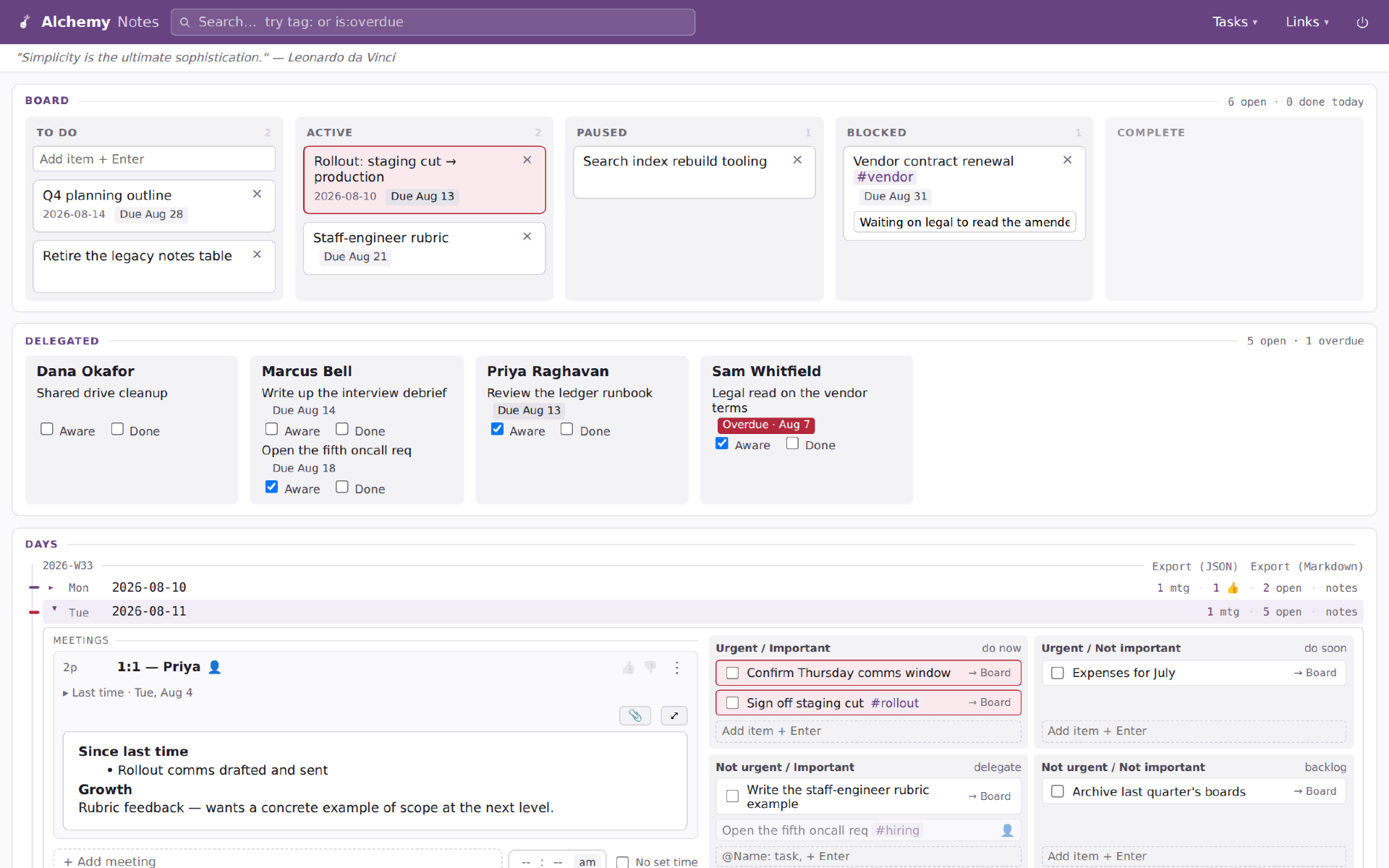
(None of the information in these pictures is real; it's all placeholder designed to show off features of Alchemy.)
Alchemy has been one of my various projects for the last few weeks. I've been working with coding agents (primarily Claude, but also some Qwen) to develop exactly the tool I want to use. And wouldn't you know it, it's become a crucial tool in my everyday.
Between the 3-ring binder and today, there have been numerous versions and implementations, usually relying on Notion or Google Docs. Over the years, as my work shifted to more strategy and meetings, one of the shortcomings of the matrix became evident: It was not good for notes; it was good at tasks. I have not found a good system to facilitate both. Sure, I could do it in a notebook, but I work with my hands on the keyboard and using pen and paper usually meant I never went back and looked except in rare circumstances.
So that was where I started: I need a system which facilitates note-taking and a priority matrix. Everything else grew out of that.
Alchemy is a combination of several organizational tools:
- The priority matrix
- Meeting notes
- Kanban tracking of tasks which extend outside of a single day
- Delegation tracking for when I hand things off to others, whether my team or coworkers
Alchemy started as a simple tool with an open text area for each day's notes, and a matrix for tasks, with the kanban added on top for the tasks that couldn't be accomplished in the single day.
Over the past weeks I've added to the app's complexity: task delegation tracking, status updating, tagging for tasks relating to projects, supporting tracking meetings as discrete objects and thus linking them in series (so previous notes are easily available), and also tracking meetings in relation to people for 1-on-1s, etc.
I feel like I'm reaching the end of natural functionality for myself. Going further would turn it into a product, and the additions would all be about supporting larger organization functions, etc.
Because it's a standalone app, it doesn't integrate with my calendar, etc. But I actually find that more of a feature than a bug, as it means I spend every morning engaging with my calendar and tasks, reviewing my day's meetings, capturing any notes or things I want to bring up. It's a good bit of mindfulness to help anchor the day.
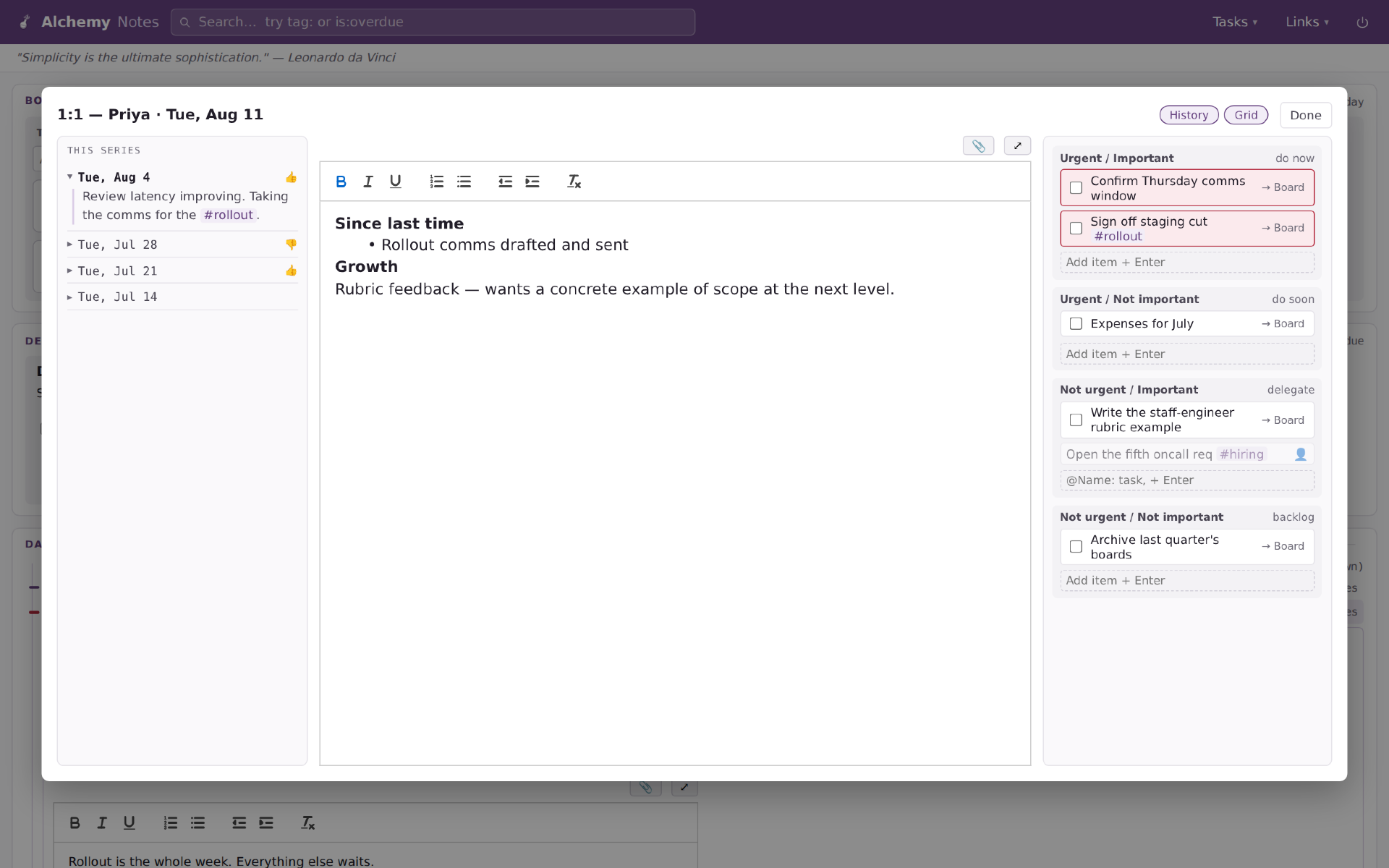
During meetings, when I click on their note section, it expands to take up the screen and give more room for writing. In addition, I recently added the functionality to maintain access to the priority matrix (though it ended up as a priority stack) for the layout so I can easily drop tasks that come out of the meeting, or enter delegate tasks, etc. Also on the left, you can see how it handles notes from the series, so I can hop back to previous meetings and check what I wrote, etc.
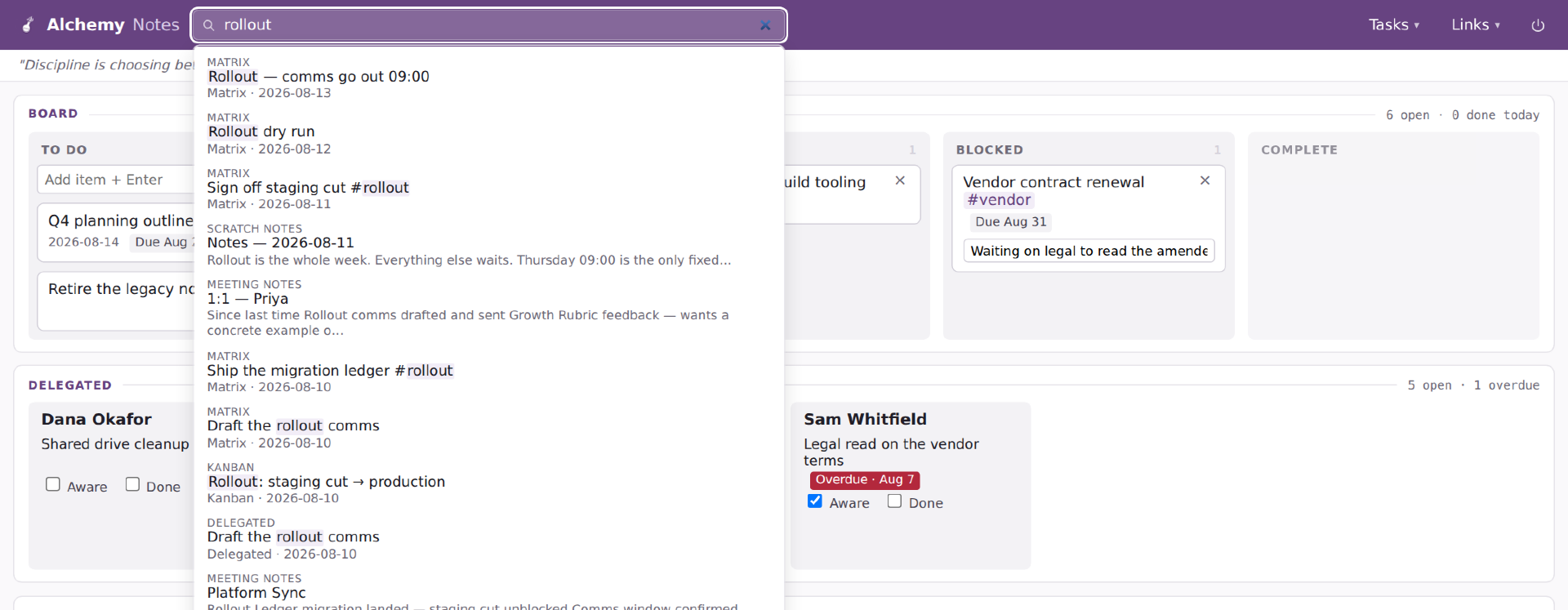
Search is a more recent addition; it was just something I knew I wanted but didn't have a big need for until I got several weeks into it and couldn't find a note I had taken. So search hits everything the system has: people, tasks, notes, etc.
There are a few more spurious features I am testing. I added a thumbs up / thumbs down as a simple signal of whether a meeting was a good use of my time. Not judging anything or anyone, but my meeting calendar is awful, and if I can identify meeting series which are reliably ones I felt were not worth my time, I can either work to fix the problem or step away from the meeting.
I also added a timer for meetings, again, trying to identify time usage on my calendar and look for outsized representation. That was literally added last night, so I have no idea how useful it will be.
 |
|
I continue to dip my toe in using ObsidianMD as a larger writing tool for myself. I've begun using it for archiving writings by others, interview and podcast transcripts, etc., for organizing and building a reference library on various topics.
I'm wondering, since both this blog and Obsidian make use of Markdown, if there is a use case where it would be useful to save my daily archives also in a markdown format which is easily importable to my Obsidian for search and reference. I think the answer is yes.
If so, then it becomes a question of best implementation. I already maintain a backup of my Obsidian "Vault" as it is called online, so it's about publishing the day's document to that location, and then syncing my laptop and phone to pull in the recent updates. That can be done easily enough manually, but of course I am interested in automating the process.
This also calls into question if I should enable a reverse setup. Perhaps retiring the web interface I use for managing this blog, and instead do my publishing via Obsidian. The downside there is when I am away from the computer, where the web interface enables me to publish easily from anywhere and on any web-connected device.
Edit:
Second idea, whenever I star an article in my Wallabag (Pocket-like tool for reading articles later) I should automatically export them to my Obsidian as well as something for future reference.
|
"What is a Fleeting Note?"
Zettlekasten is an extreme note-taking method, fantastic for researchers etc. I've written about it before. However, what I do here is not anything close to Zettlekasten. I'm not making notes on these links with the direct intent of going back and researching and digging through them. Sure, I can do that, but it is a byproduct and not the goal.
My blog and its entries are much closer to "Fleeting Notes":
The term "fleeting note" comes from Sonke Ahrens' book, How to Take Smart Notes, and describes a note which is impermanent or, to use Ahrens' language, not permanently stored in your zettelkasten.
A fleeting note is a note that is typically taken when you think of or want to remember something. Contrary to a literature note, a fleeting note is usually comprised of your own thoughts, things you'd like to remember, a passing bead of "brilliance." While these jots may sometimes refer to media you've engaged with, because they are not taken in any formal or intentional setting, they are not considered literature notes. They are simply quick captures, some of which may become permanent zettels.
|
Volo (Duo 2) Update
I'm officially a fan of the Duo 2. Ever since getting Volo up and running, I have only turned my previous phone on to transfer my 2fa code authorizations over. Other than that, I have not turned that phone on.
I love the two screen dynamic. I almost never use the phone in single screen mode, basically only when making a phone call. Other than that, I leave it open with both screens accessible. I'm still finding my ideal workflows and screen layout, but what it currently amounts to is the left (or top, depending on phone orientation) is the video for consuming information. Watching videos, reading books, reading articles, etc. The right (or bottom) screen is for acting. Taking notes, multi tasking, messaging, etc.
Taking notes particular has caused me to rethink my system. I am a big fan of Notion, but I am also keenly aware that I am now locked into their platform. If they go bust, or if they get bought out and then the new owner decides to strip it for parts, I'm going to have a hard time porting what is already in there over to a new platform. As such, I am trying to make a hard pivot to Obsidian. Obsidian uses text files, formatted with Markdown, so they are entirely portable and will live forever, even if the Obsidian app dies somewhere along the way.
Given the work I had to go through to import my tweets into a MySQL database, I am loathe to really delve into another similar platform trap.
Additionally, my note taking is hampered by the lack of use of the pen stylus. The case which will unlock that functionality will arrive on Thursday, and I find out then if it is that big of an upgrade for me or not. I will say, having it require the case (because I don't have another means of charging it since this is my own Surface device) is one of the bigger negatives I have about it all so far.
That said, I spent over an hour this evening reading with an ebook open on my left screen, and a Notion tab open on the other, to capture my highlighted passages and a few small associated notes. Perhaps fittingly I'm currently reading a book titled 'How To Take Smart Notes" by Sönke Ahrens, which is a book repeatedly cited by people online relating to note taking and organization. Here are a few of my highlights from the book:
- Writing is not what follows research, learning or studying, it is the medium of all this work. And maybe that is the reason why we rarely think about this writing, the everyday writing, the note-taking and draft-making. Like breathing, it is vital to what we do, but because we do it constantly, it escapes our attention.
- Every task that is interesting, meaningful and well-defined will be done, because there is no conflict between long- and short-term interests. Having a meaningful and well-defined task beats willpower every time. Not having willpower, but not having to use willpower indicates that you set yourself up for success.
- Studies on highly successful people have proven again and again that success is not the result of strong willpower and the ability to overcome resistance, but rather the result of smart working environments that avoid resistance in the first place (cf. Neal et al. 2012; Painter et al. 2002; Hearn et al. 1998).
All quotes captured on Volo as I sat in my recliner. I look forward to improving and expanding this system and as I use the device.
|
New Project Idea - Scrib
I make frequent use of Google's Keep as my place for short easy notes. I also sometimes use Samsung Notes, as a by product of my writing on my phone (Note 9), but those are almost entirely scribbles as I lay in bed and want to write an idea down.
I want a note taking tool which lets me grab random thoughts and save them. They might be quotes, or ideas, or reminders. They might often be half-baked.
This idea actually came as I am rethinking my personal organization and figuring out how best to build it.
Goals
- Be able to scribble a note within two clicks on my phone.
- Make the referencing of these notes more useful
#2 is where both Keep and Samsung's notes tool falls down. They are just the digital equivalent of yellow sticky notes. I want to have it be smarter at organizing notes by date, as well as by identifying keywords. If the word 'D&D' appears in multiple notes, then I want that word linked to a page which pulls all notes which use that word. I'd like to do it even for phrases, but am not sure how taxing that is processing wise.
I'm going to keep doodling on a design for the project, and then I'll add it to my coding roadmap.
|
