 Introducing Alchemy
When I was a kid, my mom ran a newsletter out of our house called "The Get Organized! News." She started with it being printed as 4-page newsletters that she would get from a local printer (like a printer company, not just printed at home), and then we would work as a family to fold, label, and stamp them, to then be shipped off at the local post office. This is where I first learned the word: collation.
In the early 2000s, she moved to doing it through email, but unfortunately it petered out, and she eventually closed it. But for the better part of a decade she diligently ran this newsletter with monthly releases.
I did not get her organization gene. Or so I thought.
Several years ago, I got formally diagnosed with ADHD, and so much of my life and my organization struggles suddenly made sense. The meds have definitely helped. Between meds and finding modern tools, my organization has gotten better. Along with the medication, I've really begun finding tools and ways of supporting me and my needs.
And this post is about introducing Alchemy, which is my homebrew organization system. But, before I show it off: let's talk about how I got to it.
For several years, my primary organization tool at work was a half-inch 3-ring binder which I populated with a custom printed template that was based around using what I have always called an 'Eisenhower matrix' or a Priority Matrix. The system is straightforward and easy: You have four boxes in a 2x2 grid. One axis is 'Urgent,' and the other axis is 'Important'. Importance here generally means 'Do I need to be the one to do it?'
So in the upper left you have both Urgent & Important, and that box of tasks is things I need to do today (ostensibly.)
The upper right is Important but not Urgent; these are backlog things I can get to later.
The lower left is Urgent but not Important, and these generally tend to be things I can delegate.
And the lower right is Not Urgent and Not Important; more often than not, this turns into questions to be researched, or low-priority asks I can delegate. For years I just called this box 'Notes'.
As I go into later, this is a good system and one I still use, but it is not a complete organization system. There is a lot of context that gets lost, and it doesn't cleanly carry things day to day, etc.
Here, we arrive to take a look at my new tool that I call 'Alchemy '-that is my organizational hub for work.
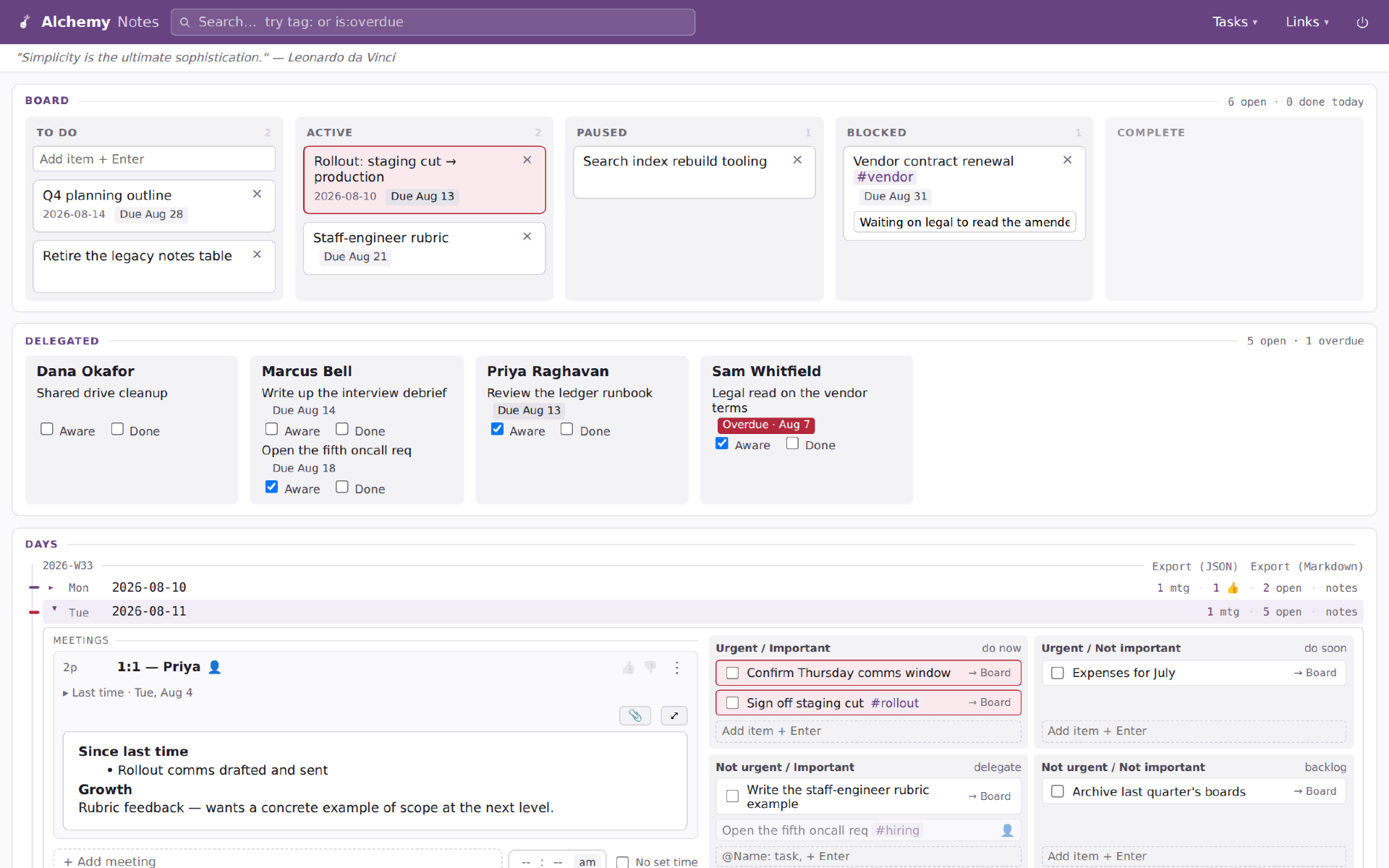
(None of the information in these pictures is real; it's all placeholder designed to show off features of Alchemy.)
Alchemy has been one of my various projects for the last few weeks. I've been working with coding agents (primarily Claude, but also some Qwen) to develop exactly the tool I want to use. And wouldn't you know it, it's become a crucial tool in my everyday.
Between the 3-ring binder and today, there have been numerous versions and implementations, usually relying on Notion or Google Docs. Over the years, as my work shifted to more strategy and meetings, one of the shortcomings of the matrix became evident: It was not good for notes; it was good at tasks. I have not found a good system to facilitate both. Sure, I could do it in a notebook, but I work with my hands on the keyboard and using pen and paper usually meant I never went back and looked except in rare circumstances.
So that was where I started: I need a system which facilitates note-taking and a priority matrix. Everything else grew out of that.
Alchemy is a combination of several organizational tools:
- The priority matrix
- Meeting notes
- Kanban tracking of tasks which extend outside of a single day
- Delegation tracking for when I hand things off to others, whether my team or coworkers
Alchemy started as a simple tool with an open text area for each day's notes, and a matrix for tasks, with the kanban added on top for the tasks that couldn't be accomplished in the single day.
Over the past weeks I've added to the app's complexity: task delegation tracking, status updating, tagging for tasks relating to projects, supporting tracking meetings as discrete objects and thus linking them in series (so previous notes are easily available), and also tracking meetings in relation to people for 1-on-1s, etc.
I feel like I'm reaching the end of natural functionality for myself. Going further would turn it into a product, and the additions would all be about supporting larger organization functions, etc.
Because it's a standalone app, it doesn't integrate with my calendar, etc. But I actually find that more of a feature than a bug, as it means I spend every morning engaging with my calendar and tasks, reviewing my day's meetings, capturing any notes or things I want to bring up. It's a good bit of mindfulness to help anchor the day.
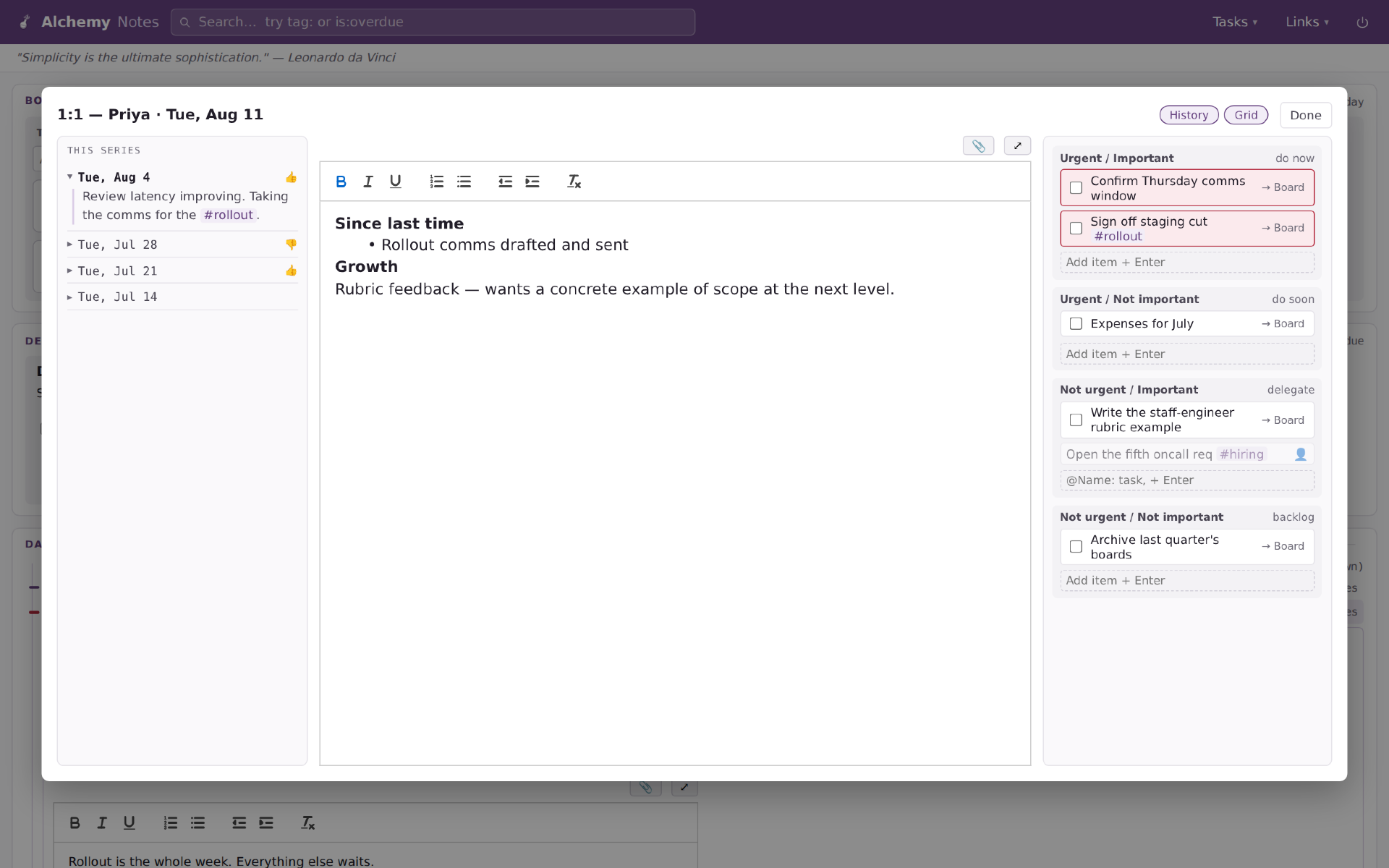
During meetings, when I click on their note section, it expands to take up the screen and give more room for writing. In addition, I recently added the functionality to maintain access to the priority matrix (though it ended up as a priority stack) for the layout so I can easily drop tasks that come out of the meeting, or enter delegate tasks, etc. Also on the left, you can see how it handles notes from the series, so I can hop back to previous meetings and check what I wrote, etc.
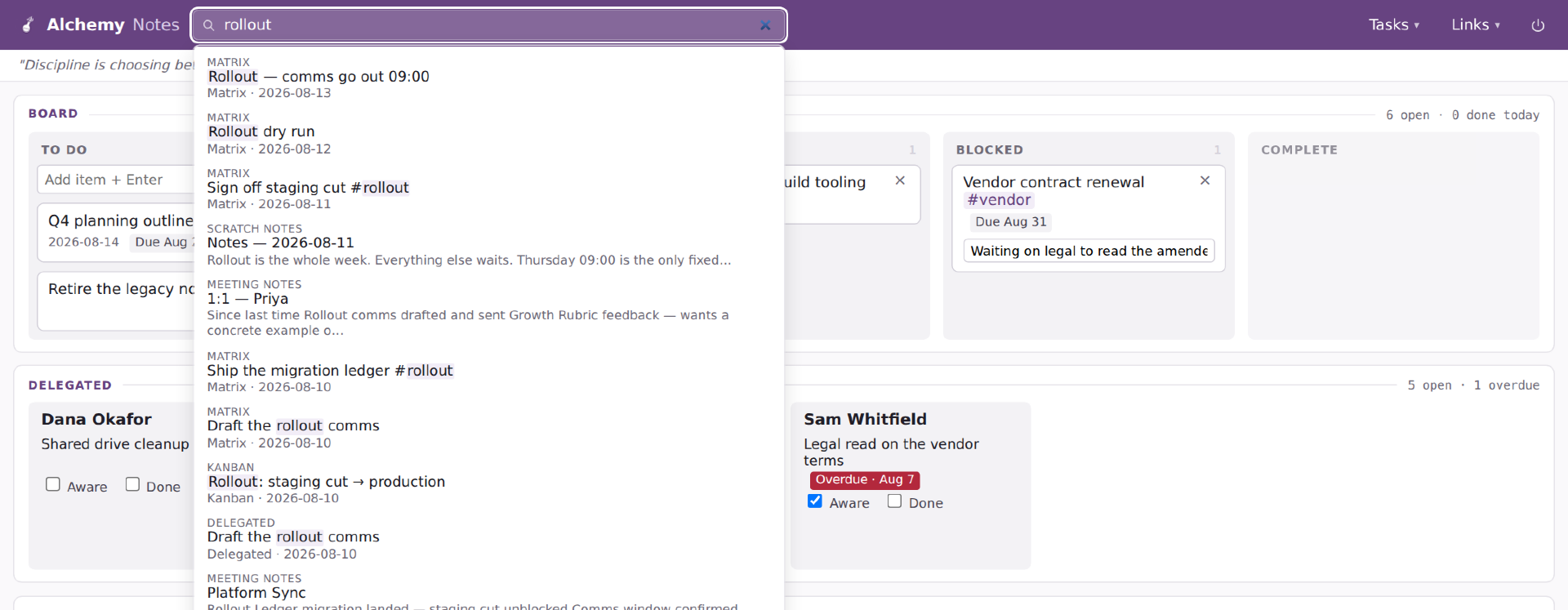
Search is a more recent addition; it was just something I knew I wanted but didn't have a big need for until I got several weeks into it and couldn't find a note I had taken. So search hits everything the system has: people, tasks, notes, etc.
There are a few more spurious features I am testing. I added a thumbs up / thumbs down as a simple signal of whether a meeting was a good use of my time. Not judging anything or anyone, but my meeting calendar is awful, and if I can identify meeting series which are reliably ones I felt were not worth my time, I can either work to fix the problem or step away from the meeting.
I also added a timer for meetings, again, trying to identify time usage on my calendar and look for outsized representation. That was literally added last night, so I have no idea how useful it will be.

 |
|
Coding updates
I recently leveled up my development process for web projects. Don't tell anyone but I've largely been operating without a dev environment. When you're coding for yourself and it's low risk, it doesn't really prove much of a concern.
Recently I finally began to implement the dev server on the local laptop within an Ubuntu WSL sandbox. And I've been slowly migrating projects into it. This blog was today's migration as I came back to working on some things.
5Flix was the first one I put in the WSL sandbox as I wanted a better ability to tweak its design and admin tools without risking messing up my friends' streaks and such on the site.
My latest personal project is one I'm calling 'Alchemy' - I haven't said anything about this one yet. It is a bespoke organization system that I use in my daily work, which combines a kanban board for my ongoing task lists, and then an Eisenhower matrix for my daily organization, with a few other aspects thrown in. Like Glowbug (my blog's homebrew CMS) I expect Alchemy to remain a personal tool and not be something I share more broadly, but we'll see.
Another small project that I have going, I call '2ndmon' as in 'second monitor.' I found I wanted a news hub for a second (or third monitor) and couldn't find what I wanted. So I put together a simple tweetdeck RSS reader for a few news feeds, then added some other small features like a set of global time clocks, and weather, etc. It's super lightweight and easy. Right now I use: NPR, Al Jazeera, and Factal. And before anyone asks it's because they are the best RSS feeds I could find without jumping through too many hoops or dealing with too much noise.

Lastly I have my ongoing personal tool for generating my top movie list simply called 'MovieRank.' It's an overengineered movie battler which puts movies into an Elo driven ranking system. It automatically pulls newly released movies in and if I happen to watch something not in it, it can quickly pull the movie in. It also lets me slice and dice my movie rankings into groupings by: director, lead actors, genre, release decade, studio, franchise, etc. It's largely stable at this point and I haven't made any sizable code changes to it in a few months.

As for how I program, these days I program inside VSCode and make use of Claude Code. Love it or hate it, it is very good at many things. I still review all changes and code and do a fair bit myself, but I cannot deny that it is helpful to me as a hobbyist coder.
In some ways Claude has changed how I enjoy coding as a side hobby, I compare it to someone who was a whittler buying a lathe or something. It gives me a lot more power and capability to do things faster than I could before.
|
Obsidian adding tables
I've bounced between Notion, Obsidian and Google Docs for various means of controlling and organizing my digital stuff. I left Notion because it wasn't a format that enabled easy migration. And I am a fan of Markdown (the backend of this blog utilizes markdown), so the idea of this integration with Obsidian is very interesting and I'll definitely be checking it out.
|
My Browser "Startup" Folders
This blog post refers to Magic: The Gathering. As noted, it is also now my job. So while I deeply love the game, I always want to alert folks I also have a bias.
Last weekend, I talked about my Firefox plugins. This weekend, I want to share how I use the browser, and one of the big step forwards for me.
In the 1990s, when dial-up internet was still in its infancy, my family was connected and (like today) my favorite game ever, Magic: The Gathering, gave me a very good reason to be online. I had discovered IRC, Internet Relay Chat. And specifically, I had found #mtg on "Efnet." It was a chatroom that could have up to 100 people in it on busy days. It was the virtual hangout for us. And that hangout, made it so I came home from school, and I got on the family computer, and I hung out for hours each day.
Remember, this was the origins of the Internet. This was back when kids were sent out of the house by default. Though that era rapidly came to a close. And this was the era when Internet access was metered. So, when one month I took the family over our 100 hours of online time in a month, it was a big deal and one I got into a bit of trouble when the parents saw my online time in a quantifiable way.
I share this tidbit from my past to show that my Internet addiction started early. My grandmother smoked her first cigarette when she was like 7. I started being online when I was 14.
These days, I wouldn't be shocked to learn I had weeks where I spent 100 hours a WEEK online, between work and home. Basically in my life, I have always been online. And it's been because of what is now my employer: Magic: The Gathering.
This entire story is to highlight how serious I take being online. I live in the browser window. Firefox is my workshop.
I used to agonize over finding the most productive or efficient start page for my browser. During Yahoo's heyday, had a feature which let you setup a custom start page on their site. Embedding weather, news, bookmarks, etc. Start pages have gone out of vogue, but I still want to be efficient and online as quick as possible.
I have a handful of pinned tabs which I keep always open in the browser:

- Gmail
- Google Calendar
- This blog
- RSS Reader for news and articles
- Wallabag saved articles
- Bluesky & Mastodon both have ones
But those are all personal stuff for me and not for work. Unfortunately, Firefox doesn't let you customize start pages by the tab container (one of the extensions I talked about last week). My solution is instead to maintain "Startup" bookmark folders. One folder for personal, one for work. I bookmark the tabs I want into each folder.
For work, I won't tell you what tabs I use, but I have settled on 3 tabs which I keep in the Work startup folder.
So if I need to start my Work browser system, I open a new tab with the 'Work' container in the browser. So all of those tabs are using work related logins and cookies, etc. Then I can right click on the 'Startup' folder and open all of the bookmarks into their tabs, and boom - I'm off to the races.
|
My Efficiency Matrix
Facebook reminded me that I first shared my simple template for an Eisenhower matrix on it. Which is wild to think because it is still my primary way of being organized for work. Interestingly, I don't use it for my home organization.
This is my current implementation:


The original version took the whole sheet of paper and quartered it into the above sections. After a while I found I needed space for general notes so I shortened the boxes, mostly on the bottom two as they are the least used. Since I don't manage anyone these days, the lower left is now for remembering emails to send or things to communicate to others (when I managed people, it was about items to delegate or follow up on with others.) The bottom right is now just general "actonable" stuff, which, honestly is used pretty infrequently. The bottom half of the page is what I use for general non-actionable meeting notes or thoughts.
The bubbles are my latest "innovation." Before, I would generally draw boxes to be checked off, now I use the bubbles. Filling one bubble shows I started on a thing. Two bubbles means I "finished" a thing.
|
After the Covid years, and while my job is still hybrid (though I choose to predominately work in the office) - I remade my trusty daily work organizer. A 3-ring binder with single day-sheets. Each sheet is basically split in half, the top half of the page is what I had been always called an Eisenhower Matrix, but which others simply call a Priority Matrix. The bottom half is blank, reserved for additional notes from the day. I've tried various digital "Priority Matrix" tools, but I've never found happiness with them. I don't know what it is.
I tried using OneNote throughout Covid, when everything went virtual. It's good as far as a data archive and organizer goes, but it just never clicked with me for using it for my daily organization during a work day. So I might use it for taking full notes of a meeting, but in terms of capturing tasks and action items, etc. Nope, no good.
In addition to that, I've come to realize is that while yes, digital only notes are useful and in many cases faster, as a consumate data consumer and multitasker, if I am sitting with both hands on my keyboard and mouse then I am going to be multitasking. And, in some meetings, that is fine, but for others I need to force myself to focus. Minimize other windows, silence notifications, ignore email, etc.
Using my physical notebook helps me disengage from multitasking on the computer. Work stuff is shifting and that is what triggered me to remake the binder.
|
Revamping my Code Project Tracking
A few years ago, I set up simple project boards in my Notion. This allowed me to track issues with my various coding projects, and make reminders for improvements or new feature ideas.
This morning, after waking up abnormally early, I sat down and revamped how it works. Previously, they were a number of individual tables. It worked fine, but the biggest issue was when I created a new project I had to go and literally manually recreate the structure for each new project to track its own tickets. Again, not a huge issue since I add scant few projects. But, it annoyed me.
So, today, I redid the system to contain it all into a single larger table that I can then filter, or group, by project. I am also hoping this will allow me to do some smarter filtering and prioritization for coding.
|
New Project Idea - Scrib
I make frequent use of Google's Keep as my place for short easy notes. I also sometimes use Samsung Notes, as a by product of my writing on my phone (Note 9), but those are almost entirely scribbles as I lay in bed and want to write an idea down.
I want a note taking tool which lets me grab random thoughts and save them. They might be quotes, or ideas, or reminders. They might often be half-baked.
This idea actually came as I am rethinking my personal organization and figuring out how best to build it.
Goals
- Be able to scribble a note within two clicks on my phone.
- Make the referencing of these notes more useful
#2 is where both Keep and Samsung's notes tool falls down. They are just the digital equivalent of yellow sticky notes. I want to have it be smarter at organizing notes by date, as well as by identifying keywords. If the word 'D&D' appears in multiple notes, then I want that word linked to a page which pulls all notes which use that word. I'd like to do it even for phrases, but am not sure how taxing that is processing wise.
I'm going to keep doodling on a design for the project, and then I'll add it to my coding roadmap.
|
